
Patient Portal Login Directions
Step 1...
You will either receive an email with the subject “HF Alerts”. Click on the link provided in the email.
You will receive a printed sheet from our receptionist with your temporary username and password.
If you have the printed sheet, type www.yourhealthfile.com into your browser.
Step 2...
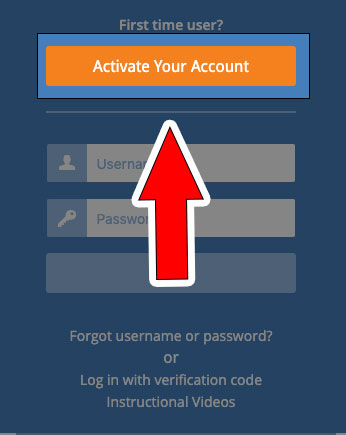
First you must activate...
First time users click on the “Activate your account” button
An Account information box will pop up requiring you to fill in the temporary username and password provided in the email or printed sheet and the patient's data of birth
Click on “Activate Account”.
Enter your desired username and password along with email address and security question and its answer.
Check box beside User Agreement.
Click Update Account.
You are not done yet!
Step 3...
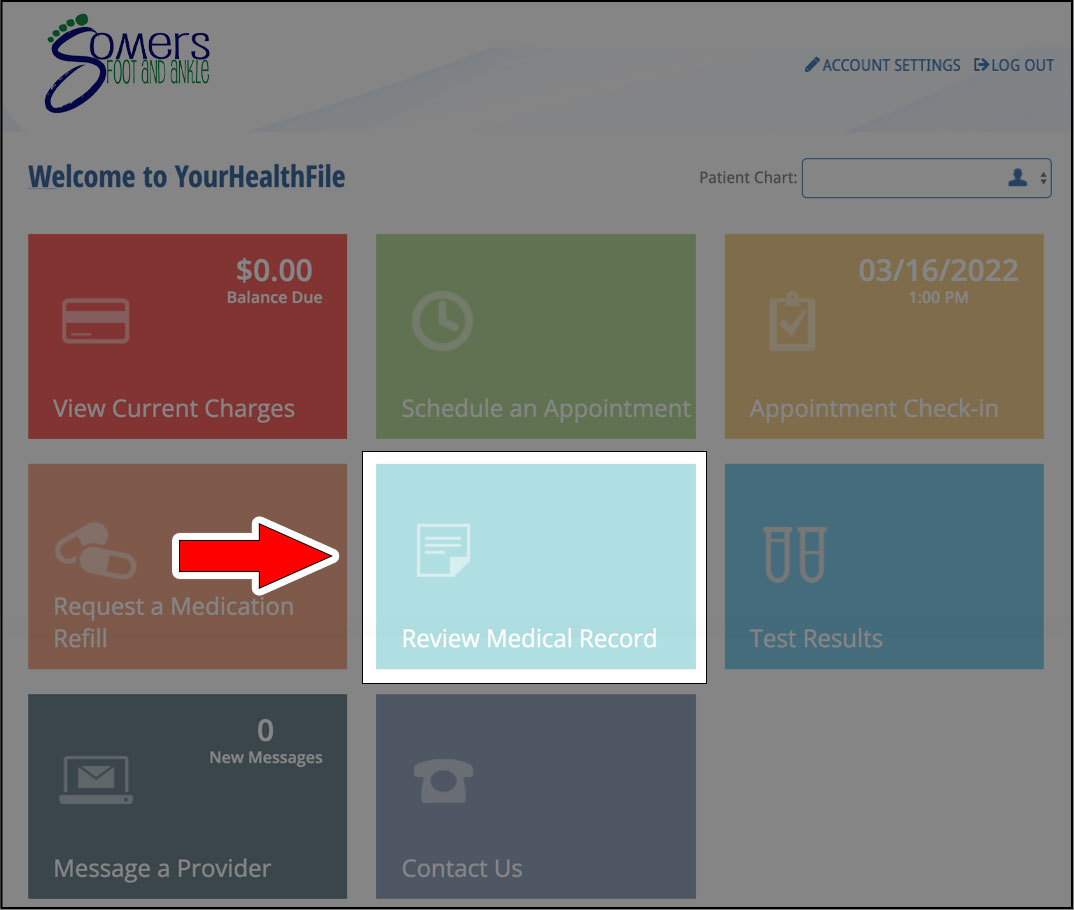
First you must activate...
...by entering your username and password you created.
There Is a small box at the top of the screen named: Patient Registration
Select the confirmation checkbox ➔ Click Next
Update Demographic information
(there is a drop-down menu with different categories of Information that need to be filled out.)
Enter the required information on each page and click Save information box at the bottom of each page. This will automatically take you to the next section.
Once all Information has been entered select the confirmation checkbox above ➔ Click Next
Update Patient Insurance ➔ Save ➔Select the confirmation checkbox ➔ Click Next
Review our HIPAA Policy ➔ Select the confirmation checkbox➔ Click Next
Review our Office Policy ➔ Select the confirmation checkbox ➔ Click Next
When prompted please provide a signature for the reviewed documents by using your mouse or finger.
NEXT:
Click on "Review Medical Record" then click the blue box on the top left of screen
Click Review Medical Record and enter the requested Information under ALL tabs on the left side of the screen
***. This step is not needed If using a desktop computer or laptop. ***
If using a phone or tablet, click on the blue box at the top left of the screen to go back to Review Medical Records and continue to enter Information.Enter your Allergies, Medical History (click MORE to enter Family and Surgical history), Medications and Social History
Click Save at the bottom of each screen
Once all the information is entered, you can now log out
Site Menu

Somers Foot & Ankle
Dr. Jennifer Somers
6483 Citation Dr.
Suite A,
Village of Clarkston, MI 48346
Phone: 248-751-1025
Fax: 248-922-9368
Hours
Monday - 8-4
Tuesday - 8-4
Wednesday - 8-4
Thursday - 8-4
Friday - Sunday - CLOSED